


Good to Drive is a driving puzzle game where you pick the right vehicle for each level and steer it past obstacles to reach the finish. It is free to play in the browser with no download, and it runs on desktop, tablet and mobile. Levels stay short and focused on smart vehicle choice.
I kept messing up my vehicle pick for a few rounds in a row, which felt pretty silly in a good way. The chunky pickup looks like it can handle everything until a tight gap or a steep edge shows up. Then you sit there thinking yeah, wrong call. That back and forth is kind of the whole charm. It is listed as an HTML5 browser game from run3play, released on 13 Jul 2026, and it currently sits at 7.7 from 13 votes, which sounds about right for something small and scrappy.
What You Are Actually Doing Here
Each level gives you a short obstacle course and asks you to get across it in one piece. The twist is the vehicle choice. Some rides climb better, some turn tighter, some just plow through bumps without tipping over. You look at the ramps, gaps, narrow bridges and weird slopes, pick what seems sensible, then drive. When it goes wrong, it is usually obvious why. Too wide, too tippy, too slow to clear the jump. I like that it never feels random. You can see the mistake. My own runs got a lot cleaner once I stopped rushing the start and actually looked at the shape of the track for a few seconds.
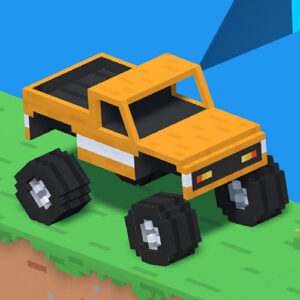
The game stays in that driving puzzle lane the whole time. No racing against other cars, no timer stress hanging over you, just you against the layout. The courses use simple blocky art, bright grass, blue sky, chunky tires, so it is easy to read where you need to go. That plain look helps because the challenge comes from angles and spacing, not from hidden stuff.
Reading the Track Before You Move
A normal run goes like this. You spawn near the start, roll forward slow, feel out the grip and the turning circle. Then the first obstacle shows up, maybe a drop, a seesaw edge, a narrow strip with a sharp turn. Short bursts work better than holding full throttle the whole way. If you blast it, you bounce or tip. If you crawl, you sometimes get stuck on a lip. The sweet spot is in the middle, with little corrections. I found myself tapping the throttle a lot instead of flooring it.
Vehicle choice matters more than speed. A tall monster style truck eats bumps but feels wide on narrow parts. A smaller car fits through gaps but struggles on climbs. So part of the play is matching the ride to the course. When I switched rides after a fail, the same track suddenly felt twice as easy. That felt good, not cheap. It rewards paying attention. Casual advice tucked in here, slow down before drops, line up straight for narrow bridges, and give yourself room to turn around when the path kinks.
How the Driving Feels in Practice
The handling is loose in a fun way. Not super precise, a bit bouncy, with weight you can feel when you land. Tires grip enough on grass and dirt edges, but steep faces will slide you back if you hit them wrong. Landings thud a little and the truck wobbles before it settles. I had a few runs where I saved a tip by steering into the lean, which got a laugh out of me. Other times I flipped for no reason except my own bad angle.
Sound and pacing are low key. You focus on the next five meters, not some big plan. That makes it good for short sessions. I played in bursts, failed a crossing, changed the vehicle, tried again, cleared it, moved on. Good to Drive keeps that loop tight without making it feel like a grind. The difficulty comes from placement and physics rather than reflexes. You do not need perfect timing. You need decent lines and patience. My favorite moments were the quiet ones where a careful crawl across a skinny section actually worked.
Controls for Desktop and Mobile
Controls change a bit by device, but the idea stays simple. On desktop you drive with the keyboard and use the mouse for menus and vehicle picks. On touch screens you use on screen buttons for driving and taps for menus. Nothing hidden.
- arrow keys or WASD to steer, accelerate and reverse on desktop
- left click to press menu buttons, confirm the vehicle choice and hit Play to start a level
- Touch buttons for gas, brake and left and right steering on tablet and mobile, plus taps for menus
- Ease off the throttle before jumps and drops to keep the car level, then reapply power on landing
The browser setup means no install and no setup fuss. It runs as an HTML5 title on desktop, tablet and mobile browsers, so you can swap devices and the basic layout still makes sense. I mostly used keyboard on desktop because steering felt steadier, but touch worked fine for slower sections where I was not making big corrections.
Games With a Similar Vibe
- Hill Climb Racing
- Parking Fury 3D
- Madalin Stunt Cars 2
- Monster Truck Wheels 2
- Offroad Life 3D












'/%3E%3Cpath%20fill='%23b2b2b2'%20d='M241%20382q0%2016%2017%2026%2017%2011%2042%2011t42-11q16-11%2017-26V269H241'/%3E%3Cpath%20fill='%239f7e00'%20d='M241%20379q0%2014%208%2023%209%209%2021%209%2014%200%2021-9%209-9%209-23V269h-59'/%3E%3Cpath%20d='M241%20339v-70h59v110q0%2014-9%2023l-6%205v-68h-15v72q-8%200-14-4v-68zm59%2040c0%2022%2015%2032%2029%2032%2021%200%2030-18%2030-32v-40h-59'/%3E%3Cpath%20fill='%239f7e00'%20d='M266%20277v5h2v12h-3v-5h2v-5h-9v5h2v5h-4v9h3v18h-5v10h34v-10h-5v-18h3v-9h-4v-5h2v-5h-9v5h2v5h-3v-12h2v-5zm42%20101q0%2010%206%2017%206%206%2015%207%2010-1%2016-7%206-7%206-17v-29h-43'/%3E%3Ccircle%20fill='%230044ad'%20cx='329.5'%20cy='372'%20r='6'/%3E%3Cellipse%20fill='%230044ad'%20cx='300'%20cy='340'%20rx='16'%20ry='21'/%3E%3C/svg%3E)