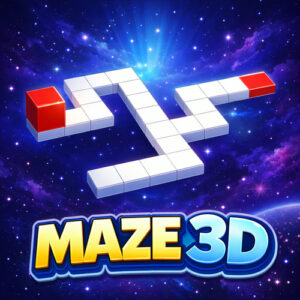




Steering a small cube across floating platforms, one grid space per move, is the whole job in Maze 3D. It is a casual 3D puzzle game you can play free in a browser, with no download and no install, and the levels are small enough to hold in your head all at once.
A Walkway Suspended in Open Space
The board is a walkway of blocks hanging in the air. There is no floor underneath and no walls around, just platforms arranged over empty space. A cube waits somewhere on that structure, a goal tile waits elsewhere, and the route between the two is the puzzle.
That layout changes how a maze reads. In a normal wall maze, a corner is something to bump into and recover from. Here an edge is a cliff. Turn the wrong way and the cube drops, which sounds harsh but keeps every decision meaningful.
The build uses HTML5 technology, so it opens quickly in a browser tab and the same version runs on a desktop, a tablet and a phone. The small boards stay comfortable on a phone screen, which suits a game built on looking ahead.
What a Round of Maze 3D Looks Like
Every level hands you the same setup: one cube, a set of blocks and an exit. You shift the cube one space at a time until it lands on the goal. No enemies walk around, no parts of the map move, and no countdown runs in the corner.
The difficulty lives in the layout. Walkways split into branches, some arms stop after two tiles, and the correct route sometimes folds back toward where it started. A couple of turns usually cover the distance, though not the turns picked in a hurry.
Boards stay small on purpose, and that is the part I like most. A layout takes seconds to read, a fall costs almost nothing, and the retry is instant. Learn the shape once, and the next attempt is clean.
Keyboard Controls and Movement
Two key sets handle everything, and they work the same way.
- Forward is W, backward is S, left is A and right is D.
- The arrow keys map the same way, so up, down, left and right do exactly what W, S, A and D do.
Each press shifts the cube a single tile, matching the one space per move rule. Keys are tapped rather than held, and either set can be used without breaking anything. Pick one and stay with it, because mixing them up halfway through a board is the easiest way to lose a cube.
Reading a Board Before You Move
A habit worth building is to trace the route backward, starting from the goal tile. The last few blocks that feed into the exit usually make the opening steps obvious, and the check takes two or three seconds. I started doing it after dropping the cube twice on one layout, and the second half of that board finally clicked.
Working backward also exposes the trap branches. A path can look generous from the cube’s position and still stop two tiles short of anything useful. Seen from the exit, that dead end is easy to spot before a single key is pressed.
Once a route is clear, moving quickly feels good. The cube answers instantly, so a memorized sequence of turns flows nicely. Just make sure the sequence survived one clean run before trusting it.
Short Sessions and Small Screens
Nothing counts time, tracks moves or keeps score, so a board waits as long as you need. That makes the game easy to fit into short breaks, and two or three levels sit comfortably inside a coffee pause.
The rating on the game’s page sits at a perfect ten from a single vote. One vote is a tiny sample, but it matches the mood here: calm, quiet and hard to get angry at. The only way to lose is a key pressed in a hurry.
Since the same build runs on desktop, tablet and mobile browsers, the layout keeps its shape on any screen. A phone handles the small boards fine, and a larger monitor simply makes the whole structure easier to scan at a glance.
More Puzzle Games to Play Next
- Scary Maze
- 10×10
- Mahjong
- 2048
- Flow Free