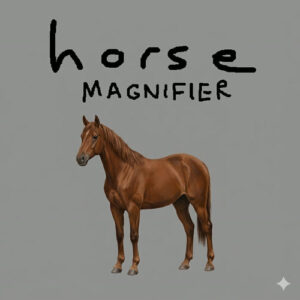



Horse Magnifier is a free browser puzzle game about fixing horses. Each level shows a broken horse image next to a clean reference, and you move circular lenses over the broken one until both horses look the same. It runs straight in the browser with no download, and there is nothing to set up before the first horse appears.
The Kind of Puzzle It Really Is
Horses are easy to draw badly, which is exactly what this game leans on. A stage might stretch the neck, detach a leg or inflate the head, and your only tools are movable lenses that blow up patches of the picture so the whole shape can line up with the reference. Developer sketbordcat started the project as a game jam entry and released it in March 2026. The free edition has grown to 18 levels since the 2.0 update added stages 11 through 18, and a paid Steam version called The Full Horse carries the idea further for anyone who wants a longer ride. Even the music is a small surprise, since the song is by Toby Fox.
Horse Magnifier Level Flow
The loop barely changes, which is a compliment in a puzzle game. You study the reference on the left, look at the mess on the right, then drag lenses one at a time and watch how the neck, body and legs respond. Early stages use a single lens and one obvious problem. Later stages pile on distortions, add more lenses and make every adjustment fight with the others. The goal is always visible, so progress comes from placement instead of guessing. When a stage stalls me, I fix the biggest shape first and leave the legs and tail for last, and that order tends to untangle the rest.
There is also a deadpan sense of humor running under all of it. The whole premise treats a horse like a machine part that fell out of alignment, and the game never winks at you about it. I laughed more than I expected to at a silhouette with a neck like a giraffe.
How the Controls Work
Everything is handled with a pointer, and there are no keys to learn:
- Left click a lens to pick it up.
- Keep the button held and drag the mouse to slide the lens across the picture.
- Let go of the button to leave the lens in place.
- On a touchscreen, press and drag with one finger instead, then lift the finger to drop the lens.
Small movements work better than big sweeps. Dragging a lens halfway across the screen usually overshoots the spot you want, and then you spend a while fixing a problem you made yourself. Nudge, compare with the reference, nudge again. That rhythm is the real skill here.
The game runs in desktop browsers and on tablets and phones, though the developer notes that it is broken on Apple devices, so a laptop or an Android tablet is the safer bet.
Games With a Similar Pull
- I Wish I Were the Moon
- Find Ivan
- I Love Hue
- Horse Magnifier: The Full Horse