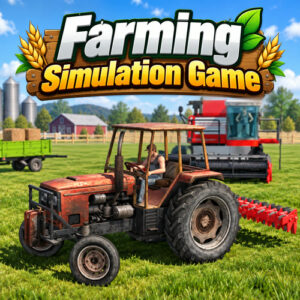







Farming Simulation Game is a browser farming simulation where you drive a tractor around a country farm, work the fields and bring in the harvest. It runs on HTML5, so it opens straight in a browser tab with no download and no install, and it plays for free on desktop, tablet or phone.
What a Farming Session Looks Like
Most sessions settle into a slow loop of small jobs, and for a lot of people that is exactly the point. You climb onto the tractor, drag a plough across a field, then come back with seed and water. A patch of ground that started out bare fills up with crops, and pulling a harvester through a full field is the bit that keeps players coming back. Nothing is rushed. The countryside looks calm, the engine hums, and you decide your own pace.
Tractors, Fields and the Farm Loop
The work breaks down into a handful of clear steps. Ploughing opens up the soil so it can take seed, planting drops the crop into the ground, and watering keeps it alive until it is ripe. Harvesting turns a grown crop into money, and that money goes straight back into the farm. Farming missions sit on top of the routine and usually ask for one specific job, like hauling a load somewhere or bringing in a certain crop, which gives a session some direction when you are not sure what to tackle next.
The tractor is the tool you spend the most time with. It steers like a heavy machine, so corners need a little planning and a badly angled pass over a field means you have to come back around. Learning to line up a row properly takes a few runs, and once it clicks the whole loop feels smoother.
Keeping the Farm in Good Shape
Money is tight early on, and deciding what to spend it on is the management half of the game. Better equipment makes each job faster, while ploughing and harvesting the same ground over and over slowly turns a scrappy plot into something that looks like a real working farm. The game carries a rating around 7.4 from roughly 31 votes, and that feels about right for a calm, low pressure sim that is more about routine than spectacle.
Driving Controls on Desktop and Mobile
- W, A, S and D drive and steer the tractor.
- The arrow keys do the same job if you prefer them.
- On a phone or tablet the same movement uses on screen touch controls.
Menus and mission prompts are handled with the mouse and a normal left click. There is no keyboard shortcut to memorise beyond the movement keys, which keeps the controls easy to pick up on any device.
Games in the Same Countryside Mood
- Big Farm
- Farm Frenzy
- Tractor Farm: Farming Simulator
- Farming Simulator 3D
- Hay Day