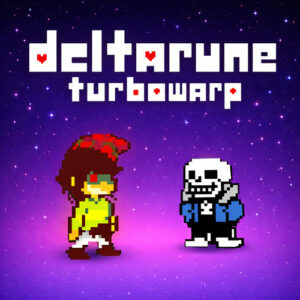



Deltarune TurboWarp is a free browser role playing game that recreates the first two chapters of Toby Fox’s Deltarune inside TurboWarp. You walk through dark worlds, chat with strange characters, and settle turn based fights by attacking or sparing enemies while dodging bullet patterns. It opens in a browser tab with no download, and a keyboard is all you need.
What This Fan Build Includes
Droplets started the project in Scratch around late August and later moved it to TurboWarp, a modified Scratch engine that runs projects faster than the original. Every piece of music, artwork and sound design belongs to Toby Fox, and the developer says that plainly on the project page. This is an unofficial fan project, still in development, and the source files are open for anyone curious about how a Deltarune recreation gets built. Chapters 1 and 2 are the whole package for now, so a run ends where the original demo content ends.
Exploration and Bullet Dodging Battles
You steer Kris and the rest of the party around town streets, forests and stranger places, poking at everything that looks interactive. The writing carries the same mix of jokes and quiet dread the original is known for, and familiar faces from Deltarune show up along the way.
Battles switch things up. Every encounter gives you options like Fight, Act, Item and Spare, and sparing enemies is a real path with real consequences instead of a novelty choice. Then the bullet dodging starts. Your little heart slides around inside a box while projectiles flood the screen, and the arrow keys are the only thing keeping it alive. Some of the later patterns get nasty, and the tougher fights took me a handful of retries before they clicked.
Do not expect a short five minute break out of this one. The project page lists the average session as a few hours, and that tracks, since chapters 1 and 2 carry hours of dialogue, exploring and boss fights between them. You can hop between chapters from the selection screen whenever you want, though the story lands better in order.
Save data has been shaky in the browser build. The developer recommends the downloadable version if you care about keeping progress, which is worth knowing before starting a long session.
Controls You Need to Know
The browser build documents a keyboard setup, and it matches the original almost exactly.
- Arrow keys: move your character during exploration and dodge projectiles during battles.
- Z: confirm selections in menus and dialogue.
- X: cancel actions in menus and interactions.
- Left and right arrows: switch between chapters on the selection screen.
Controller support is listed as a work in progress on the project page, so a keyboard is the dependable way to play right now. Give yourself a few minutes with the controls before judging the combat. The dodge timing feels stiff until your hands adjust.
Games Similar to Deltarune TurboWarp
- Undertale
- Undertale Yellow
- OMORI
- EarthBound
- Lisa: The Painful