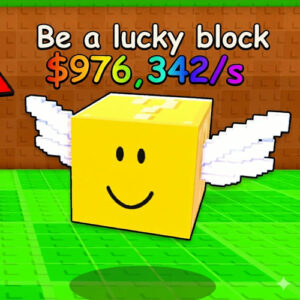







Be a Lucky Block is a free 3D obby adventure game you can play right in a browser. You take control of a blocky winged block and try to cross a bright Roblox-style world without getting grabbed by brainrots. Everything runs on HTML5, desktop, tablet and phone, and there is nothing to download.
A Blocky World Full of Bases and Bad Guys
The map is loud and colorful in a way only these sandbox worlds get. Red and green roads cut through grass, ramps lead up to floating platforms, and little bases sit around with names floating above them, like the one a bot named Sammy owned in my session. Those bases are the danger zones most of the time. Brainrots wander the map looking for a block to catch, and when one reaches you it grabs your character and marches you toward its own base. You are not stuck there forever. Breaking out of the grip, finding a route back and reaching the safe zone before another creature catches you is the whole game. Some runs turn into a scrap within ten seconds of spawning. Others stay quiet for a while and then three of them come from different directions at once. The pressure comes from never knowing which kind of run you got.
Upgrades, Speed and the Reborn Button
Your money counter never really stops moving. Income ticks up while you survive, and the Shop spends it on things like speed boosts and better odds at rare brainrots. Speed straight up changes how a chase feels, because a slow block gets cornered while a fast one can weave through a crowd of creatures. I kept an eye on my speed gauge during a run, sitting at 25, and the gap between a walking pace and a full sprint matters more than any other stat here. The Reborn button trades part of that progress for a stronger start, which is the usual deal in these games and it works fine in this one too. The game is made by xFrozen x Dudes, runs on HTML5, and came out on 24 February 2026, sitting at a 9 out of 10 rating from 135 votes at the time of writing. Desktop, tablet and mobile browsers all handle it.
Controls on Desktop and Touch Screens
Nothing complicated here, which is part of why it works on so many devices. Moving and jumping are all you need in the moment.
- WASD or the arrow keys move your block in any direction.
- Spacebar jumps, which helps on ramps and when a brainrot cuts off your path.
- Drag with the mouse to swing the camera around behind you.
- On a phone or tablet an on-screen stick handles movement and the jump button sits on the right.
- The Shop, Reborn and settings icons live on the right edge of the screen.
Games With a Similar Feel
- Tower of Hell
- Steal a Brainrot
- Obby Creator
- Roblox
- Minecraft